Guide de dépannage pratique Siemens S7-1200 | Sélection du matériel, programmation, communication et conseils sur site
Jun 19, 2026
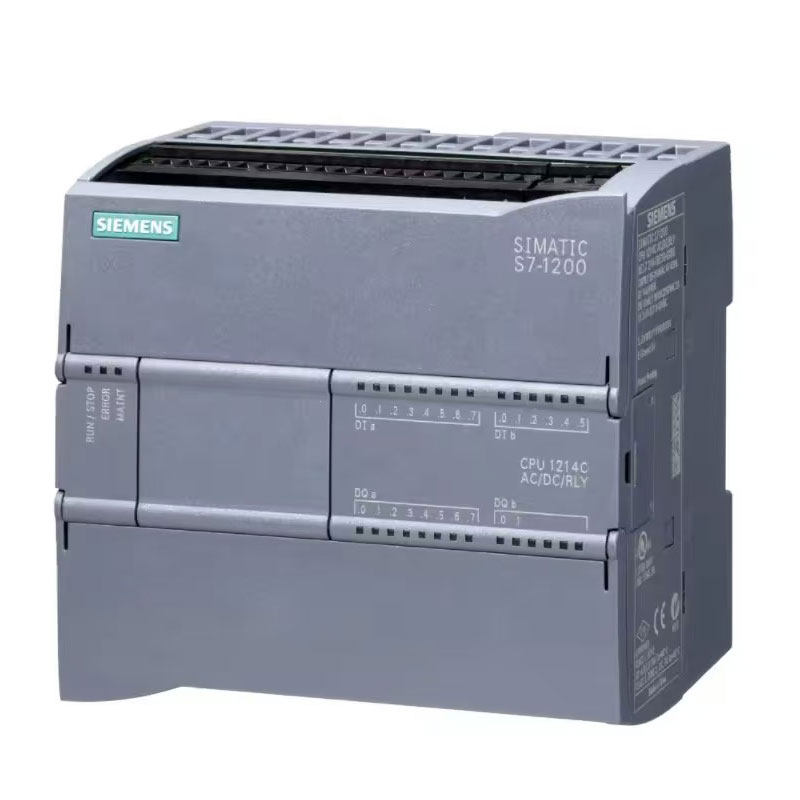
IntroductionLa plupart des ingénieurs en automatisation et des acheteurs d'équipements ne maîtrisent que les opérations de programmation de base de l'automate Siemens S7-1200, mais rencontrent fréquemment divers problèmes sur site : connexion de l'automate défaillante après l'arrivée de l'équipement, tremblement du servomoteur, données analogiques instables, arrêts pour cause de défaut aléatoire et échecs de téléchargement du programme.Dans la plupart des cas, ces problèmes sont non causé par des dommages matérielsmais par une sélection inappropriée, un câblage non standard, des paramètres incorrects et de mauvaises habitudes de programmation.Ce blog est entièrement consacré à compétences pratiques en résolution de problèmes et pièges fréquents Pour les utilisateurs finaux et les techniciens de terrain. Pas de paramètres théoriques superflus : toutes les solutions sont directement applicables pour corriger 90 % des pannes courantes du S7-1200, stabiliser le fonctionnement des équipements et réduire les coûts après-vente.1. Erreurs de sélection critiques | Évitez les reprises et les pertes financières1.1 Version d'alimentation du processeur incorrecte = Contrôle de mouvement défaillantDe nombreux débutants choisissent des modèles d'automates programmables au hasard sans tenir compte des différences de version, ce qui entraîne l'indisponibilité des fonctions de positionnement à haute vitesse et de servocommande après l'installation.Version CC/CC/CC (Norme industrielle et préférée)Alimentation 24 V CC, sortie transistorPrend en charge une sortie d'impulsions haute vitesse de 100 kHz, pilote directement les servomoteurs et les moteurs pas à pas.Idéal pour tous les équipements d'automatisation de positionnement, de découpe et de mouvement alternatifVersion AC/DC/RLY (Uniquement pour la simple commande marche/arrêt)Alimentation 220 V CA, sortie relaisAbsence de fonction d'impulsion à haute vitesse, impossible de réaliser un contrôle de positionnement.Applicable uniquement aux ventilateurs, pompes à eau, éclairages et dispositifs de démarrage/arrêt simplesRègle clé : Choisissez DC/DC/DC sans condition si votre appareil comporte des fonctions de servo, de moteur pas à pas ou de positionnement !1.2 Marge de performance du processeur insuffisante | Bégaiements et pertes d'impulsionsNormes de sélection S7-1200 vérifiées sur le terrain pour les projets industriels :Dispositifs logiques simples et E/S ordinaires : 1212CServomoteurs ≤4 axes, équipements d'emballage et de convoyage : 1214C (Modèle universel le plus populaire)Signaux analogiques multiples, régulation PID et mise en réseau multi-appareils : 1215CPositionnement, découpe et synchronisation multi-axes de haute précision : 1217CConseil pratique: Conserver l'utilisation de la mémoire du programme moins de 70% et un temps de cycle OB1 inférieur à 100 ms. Le dépassement de ces valeurs peut facilement entraîner une perte de paquets, des saccades du programme et des arrêts inopinés de l'équipement.1.3 Installation désordonnée du module d'extension | Échec de la reconnaissance du moduleLe S7-1200 possède des règles strictes concernant les emplacements d'extension. Tous les modules d'extension doivent être installés séquentiellement à partir du premier emplacement situé à droite du processeur.Des emplacements vides ou une installation désordonnée provoqueront des dysfonctionnements et rendront les modules méconnaissables.Agencement optimal : Éloignez les modules de communication et d’alimentation des modules à haute température afin d’éviter les pannes dues à la surchauffe ; placez les modules de sortie numérique le plus à droite afin de réduire les interférences de signal.2. Conseils de câblage et d'installation du matériel | Éliminer les interférences et les déclenchements intempestifs2.1 Dérive des données et signaux analogiques instables | Solution permanentePanne courante sur site : les données de température, de pression et de débit fluctuent continuellement, même avec des capteurs intacts et des programmes corrects.Solutions:Utilisez des câbles blindés pour les signaux analogiques avec mise à la terre à une seule extrémité.Séparez les câbles d'alimentation (câbles servo/onduleur) des câbles de signal à une distance supérieure à 20 cm ; ne les faites jamais passer dans le même conduit.Activez le filtrage analogique et l'échantillonnage lisse dans TIA Portal pour éliminer complètement la dérive des données.2.2 Déclenchements intempestifs et clignotements lumineux aléatoires liés à l'entrée numériqueDe nombreux utilisateurs constatent un clignotement aléatoire des indicateurs d'entrée de l'automate programmable lors de l'arrêt de l'équipement.CauseInterférences de fréquence industrielle et tension induite des longs câbles de signalSolution: Ajustez le délai d'entrée DI à 3 ms~5 ms dans la configuration matérielle du portail TIA afin d'éliminer complètement les déclenchements intempestifs à faible coût.2.5 Redémarrages et pannes aléatoires causés par une alimentation électrique instableLes processeurs S7-1200 sont sensibles aux ondulations de courant. Les alimentations à découpage de mauvaise qualité peuvent provoquer des déconnexions aléatoires, des pertes de programme et des erreurs de module.Recommandation: Adopter des alimentations régulées industrielles et installer des anneaux magnétiques anti-interférences au niveau du terminal d'alimentation du processeur afin d'améliorer considérablement la stabilité de l'équipement.3. Compétences pratiques en programmation | Programmes stables, maintenables et sans bogues3.1 Évitez d'utiliser abusivement les bits de mémoire (M bits) pour prévenir les défauts cachésLes ingénieurs novices utilisent souvent M0.0, M0.1 et d'autres bits M pour la logique intermédiaire, ce qui conduit à conflits variables et désordre logique après une utilisation prolongée des équipements.Meilleures pratiquesPrioriser blocs de données de base de données Pour la programmation S7-1200. Attribuez indépendamment des variables aux actions, alarmes et états de l'équipement afin de garantir une logique claire, l'absence de conflits et une maintenance aisée.3.2 Pièges liés au minuteur | Éviter les écarts de synchronisation et les dérives logiquesDéfaut courant : synchronisation imprécise et dérive de la logique cyclique lors d’un fonctionnement prolongé.Règle d'évitementNe mélangez pas les temporisateurs TON et TOF pour la logique d'oscillation cyclique. Utilisez exclusivement des temporisateurs CEI pour une résolution stable et une erreur de temps cumulée nulle.3.3 Ajout de tolérance aux pannes pour les programmes analogiques | Prévention des pannes d'équipementUne déconnexion du capteur et un mauvais contact entraîneront un plantage du programme, un dérèglement du PID et un dysfonctionnement en l'absence de logique de tolérance aux pannes.Méthode universelle de tolérance aux pannesDéfinir des seuils de détection supérieurs et inférieurs pour les données analogiques. Verrouiller les sorties et déclencher des alarmes lorsque les valeurs dépassent la plage normale afin d'éviter les risques de surchauffe et de surpression.3.4 Solution ultime pour les défauts de retour à l'origine des axesProblème fréquent : L'axe s'arrête avec une alarme lorsqu'il atteint le capteur de fin de course pendant la phase de retour à l'origine, sans réinitialisation automatique.Solutions:Activez la fonction « inversion automatique du contacteur de fin de course » dans la configuration matérielle.Augmentez correctement le temps d'accélération et de décélération pour éviter une collision brutale avec les limites.Conservez une distance de sécurité entre les interrupteurs de fin de course et les butées mécaniques.4. Dépannage des communications | Résolution des problèmes de connexion et des déconnexions aléatoires4.1 Automate programmable introuvable et connexion PC défaillante90 % des échecs de connexion sont dus à des problèmes de réseau plutôt qu'à des dommages matériels :Adresse IP par défaut de l'automate programmable : 192.168.0.1, susceptible d'entrer en conflit avec les segments d'adresse IP du réseau local.Configurez une adresse IP statique pour la carte réseau du PC (même segment que l'automate programmable), désactivez l'acquisition automatique d'adresse IP.Désactivez le pare-feu et l'antivirus de votre PC pour empêcher l'interception des communications.4.2 Déconnexion aléatoire de PROFINET et de l'IHMCompétence de baseUtilisez PROFINET plutôt que Modbus pour la mise en réseau de plusieurs appareils. Augmentez suffisamment le délai d'expiration de la communication et utilisez des câbles Ethernet blindés industriels pour éliminer les déconnexions dues aux interférences sur site.4.3 Échec du téléchargement du programme dû à une incompatibilité de version du micrologicielPiège fréquent : les programmes compilés avec une version élevée de TIA Portal ne peuvent pas être téléchargés sur des automates programmables industriels (API) dotés d'un firmware de version inférieure.SolutionVérifiez la version du firmware de l'automate programmable avant de la télécharger, assurez-vous qu'elle corresponde à la version matérielle indiquée sur le portail TIA, ou mettez à jour le firmware en ligne pour unifier les versions.5. Compétences en dépannage rapide sur site | Outil d'efficacité après-vente5.1 Diagnostic via mémoire tampon de diagnostic (localisation de panne la plus rapide)Le S7-1200 est équipé d'un puissant système de diagnostic intégré, enregistrant l'heure exacte et la cause de tous les arrêts et défauts de modules.Passez en mode en ligne dans le portail TIA et consultez la mémoire tampon de diagnostic pour localiser précisément les défauts, en évitant les inspections à l'aveugle et les contrôles de programme.5.2 Arrêt aléatoire sans alarmePrincipales causes : durée excessive du cycle de programme, taux d'occupation élevé de la mémoire et interférences électromagnétiques.SolutionsSimplifier la logique du programme, réduire le temps de cycle OB1, optimiser le câblage et ajouter des mesures anti-interférences.6. Conseils d'entretien quotidien et d'allongement de la durée de vieNettoyez régulièrement la poussière du canal de dissipation thermique de l'automate programmable afin d'éviter les baisses de fréquence dues à la température élevée et les pannes.Installez une carte mémoire pour vos projets importants et sauvegardez régulièrement vos programmes afin d'éviter toute perte de données.Vérifiez la tension d'alimentation avant de remettre sous tension un équipement resté longtemps hors service afin d'éviter d'endommager le processeur par une surtension.Ne jamais remplacer à chaud les modules de signal pour éviter la surchauffe des ports.RésuméL'automate programmable Siemens S7-1200 présente une excellente stabilité intrinsèque. 90 % des pannes sur site sont dues à… sélection incorrecte, câblage non standard, paramètres manquants et absence de tolérance aux pannes du programme.La maîtrise des compétences pratiques mentionnées ci-dessus peut vous aider à éviter les pièges liés à l'approvisionnement, à résoudre complètement les problèmes courants tels que la gigue analogique, la déconnexion de la communication, les défauts de positionnement et les arrêts aléatoires, à réduire considérablement la pression après-vente et à améliorer la stabilité globale des équipements.InteractionQuelles pannes complexes du S7-1200 avez-vous rencontrées sur le terrain ? Partagez votre expérience de dépannage en laissant un commentaire !




 Réseau IPv6 pris en charge